
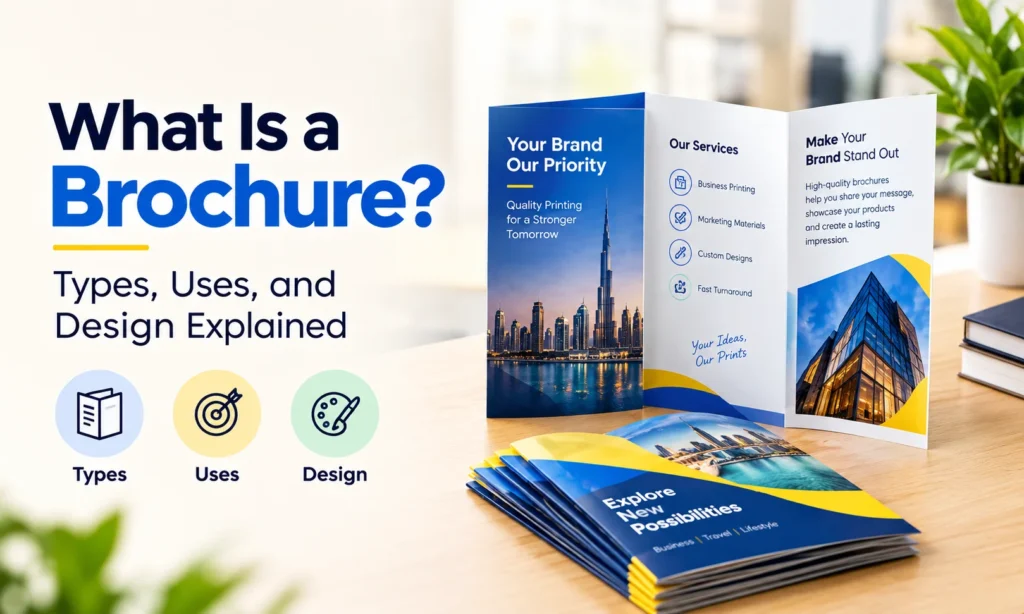
A business has plenty to say about its products and services, but customers rarely have time to read everything. A well-designed brochure brings the most important information together in a format people can easily explore. It introduces the business, presents its offerings, and gives readers something useful to keep for future reference. A brochure is a printed or digital document used to share information about a company, product, service, or event. It usually combines short descriptions, images, headings, and contact details in an organised layout. Printed brochures often feature folded panels, although they can also come in multi-page formats. Businesses use brochures during sales meetings, exhibitions, product launches, and customer visits. From a simple tri-fold design to a detailed company profile, brochures remain a practical way to present information and support marketing activities.
The Purpose of a Brochure in Business Marketing
A brochure gives potential customers a clear picture of a business without requiring a lengthy conversation. It brings together essential details that people can read at their own pace. Companies use brochures to introduce new products, explain services, display photographs, and communicate their main selling points. A property developer may use one to present apartment layouts and building features, while a travel agency can display destinations and tour packages.
Brochures also support face-to-face marketing. Sales representatives can distribute them during meetings, and businesses can place them at reception desks, exhibitions, and retail counters. Their value comes from making information accessible. A reader can return to the brochure, compare details, and use the contact information when ready to make an enquiry. A brochure works best when it has a clear purpose and presents information that matters to its intended audience.
Popular Types of Brochures
Brochures come in different formats, each offering a particular arrangement of panels or pages. The right format depends on the amount of information, visual content, and presentation style.
Bi-Fold Brochure
A bi-fold brochure uses a single sheet folded in half to create four panels. The front panel usually displays the main title and visual design. The inside panels contain product or service information, while the back can include contact details. This format provides enough space for a company introduction, service overview, or product presentation without making the content feel crowded. Bi-fold brochures suit corporate profiles, real estate presentations, restaurant promotions, and professional services.
Tri-Fold Brochure
A tri-fold brochure divides one sheet into three sections, creating six panels. Its compact format makes it convenient to distribute during exhibitions, meetings, and promotional campaigns. Businesses can organise the content into separate sections for introductions, services, benefits, images, and contact information. The folding method affects the reading order, so the artwork must be arranged correctly before printing. Tri-fold brochures are popular for travel services, healthcare information, hospitality promotions, and local business advertising.
Z-Fold Brochure
A Z-fold brochure uses alternating folds to create a zigzag arrangement. When opened, the panels can form a continuous visual layout. This makes the format suitable for information that follows a sequence. Businesses use Z-fold brochures for product ranges, event programmes, timelines, and step-by-step information. The design can also display connected images or graphics across several panels.
Gate-Fold Brochure
A gate-fold brochure features outer panels that open toward the centre, revealing the main content inside. This arrangement creates an attractive presentation for large photographs, product images, and promotional artwork. Gate-fold brochures suit premium product presentations, property marketing, luxury hospitality, and special events. The central section becomes the main visual feature, so the design should make effective use of that space.
Multi-Page Brochure
A multi-page brochure contains several pages, usually joined through a suitable binding method. It provides more space for detailed information, photographs, specifications, and product descriptions. Businesses often use this format for company profiles, property developments, educational programmes, and extensive service presentations. A clear page structure and consistent design help readers navigate longer brochures without losing interest.
Common Brochure Sizes and Formats
Brochure size affects the available design space, printing requirements, and ease of distribution. Businesses can select standard paper sizes or request custom dimensions for particular marketing materials.
- A4 Brochure (210 × 297 mm): A familiar size for company profiles, product information, and corporate presentations. An A4 sheet can also be folded into smaller panels.
- A5 Brochure (148 × 210 mm): A compact format suitable for service information, event promotions, and smaller business presentations.
- A6 Brochure (105 × 148 mm): A small format for concise promotional content and handouts.
- DL Brochure (99 × 210 mm): A slim format commonly associated with promotional literature and rack displays.
- Square Brochure: A visually distinctive option for creative portfolios, hospitality promotions, and premium marketing materials.
The finished dimensions depend on the original sheet size and folding arrangement. Businesses should confirm both the flat and folded measurements before preparing artwork.
Essential Elements of an Effective Brochure Design
A brochure needs more than attractive colours and photographs. Its layout should make the information easy to find, read, and remember.
An Attractive Front Cover
The cover creates the first impression. A clear headline, suitable image, and recognisable business identity help readers identify the brochure’s subject immediately. Avoid filling the cover with too much text. A short message supported by strong visuals often creates a cleaner appearance.
Clear and Organised Content
Readers should be able to find important details without searching through crowded paragraphs. Use descriptive headings, short sections, and logical content placement. Introduce the business or product first, then present the most relevant features and supporting information. Keep each panel dedicated to a clear subject wherever possible.
Quality Images and Graphics
Photographs and illustrations can communicate information faster than lengthy descriptions. Use images that accurately represent the products, services, or subject being promoted. High-resolution photographs and properly prepared graphics also help prevent blurry or pixelated results during printing.
Consistent Colours and Typography
Colours and fonts should match the business identity. Use a clear heading style, readable body text, and a limited selection of complementary colours. Excessive font variations can make the brochure appear disorganised. Good contrast between the text and background improves readability.
Suitable White Space
Empty space is an important part of brochure design. It separates sections, improves readability, and prevents images and text from competing for attention. A brochure does not need to fill every available area with information. Balanced spacing makes the layout easier to follow.
Visible Contact Information
Readers need a clear way to contact the business after reviewing the brochure. Include relevant details such as a phone number, website, email address, or business location. A short call to action can encourage readers to request a quotation, explore a product collection, or arrange a consultation.
Brochure Printing Materials and Finishing Options
Paper selection influences the appearance, texture, and durability of printed brochures. Different materials create different impressions, so the paper should suit the brochure’s purpose and design.
Glossy Paper
Glossy coated paper has a reflective surface that makes photographs and colourful graphics appear vibrant. It suits product promotions, travel brochures, and marketing materials with prominent imagery. The reflective finish may create glare under strong lighting, particularly across text-heavy sections.
Matte Paper
Matte coated paper offers a less reflective appearance. It works well for corporate brochures, service presentations, and designs with substantial text. The finish creates a smooth appearance without the strong shine associated with glossy paper.
Uncoated Paper
Uncoated paper has a more natural texture and is often easier to write on. It suits informational brochures, forms, and promotional materials that require a simple printed appearance. Colours and photographs may look different on uncoated paper compared with coated stock.
Paper Thickness and Lamination
Thicker paper can give brochures a more substantial feel, while lighter stock may suit large distribution quantities. Lamination adds a protective surface layer and can create a gloss, matte, or other specialist finish. The final selection should consider folding, handling, cost, and the intended presentation.
Brochure vs Flyer, Leaflet, and Booklet
Brochures, flyers, leaflets, and booklets all communicate information, but they differ in their usual structure and level of detail.
- Brochure: Presents organised promotional or informational content, often through folded panels or multiple pages.
- Flyer: Usually consists of a single unfolded sheet featuring a short promotional message, event announcement, or special offer.
- Leaflet: A small printed information sheet that may be folded or unfolded. It often communicates a specific message or topic.
- Booklet: Contains multiple bound pages and offers more space for detailed content.
The terms sometimes overlap in the printing industry. A folded leaflet may resemble a brochure, while a multi-page brochure may look similar to a booklet.
The main distinction is the amount of information and the way the content is presented.
Printed Brochures and Digital Brochures
Businesses can distribute brochures in printed or digital formats.
Printed brochures create a physical marketing piece that customers can collect during meetings, exhibitions, and visits. They allow readers to review information without using a device.
Digital brochures are commonly shared as PDF files or through online viewing platforms. They can be sent through email, linked from websites, and distributed through digital communication channels. Digital formats also make it easier to update information without printing a new batch, although the updated file must still reach the intended readers.
Both formats can use the same core content, but the layout may need adjustments for screen viewing and printed production. Businesses can use printed brochures for direct customer interactions and digital versions for online enquiries and follow-up communication.
Common Brochure Design and Printing Mistakes
Small design problems can affect the final appearance and readability of a brochure.
- Too much text: Long paragraphs and crowded panels make information difficult to scan. Keep the wording concise and organise details into clear sections.
- Low-quality images: Blurry photographs and stretched graphics reduce the quality of the finished print. Use suitable image files and check their resolution.
- Poor fold alignment: Text and graphics placed too close to fold lines may become difficult to read. Account for panel dimensions and folding requirements during design.
- Missing contact details: A brochure without clear contact information may leave interested readers unsure of the next step.
- Inconsistent design: Unrelated colours, fonts, and graphic styles can weaken the overall appearance. Maintain a consistent visual identity.
- Incorrect print setup: Missing bleed, unsuitable margins, and incorrect colour settings can affect production. Confirm the printer’s artwork specifications before submitting files.
A final proof helps identify these issues before printing begins.
Brochures for Different Business Marketing Needs
Brochures can support a wide range of business activities.
- Corporate companies use them to introduce their background, services, and capabilities.
- Retail businesses can present product collections with photographs and descriptions.
- Real estate companies use property brochures to display layouts, amenities, and development details.
- Hotels and travel businesses can introduce accommodation, destinations, and available packages.
- Educational institutions may distribute brochures containing programme details, facilities, and admission information.
- Event organisers can use brochures to share schedules, venue information, and programme highlights.
Each brochure should present information that matches the interests of its readers. A product-focused brochure needs clear specifications and images, while a corporate brochure may place greater emphasis on business capabilities and services.
Create a Brochure That Communicates Your Message
A good brochure makes business information easier to explore. It introduces the subject clearly, organises important details, and gives readers a convenient reference they can return to later. The format, paper, images, and layout should work together rather than compete for attention. A compact tri-fold brochure may suit a short service introduction, while a multi-page design can present a larger collection of information.
Clear writing, readable typography, suitable materials, and accurate printing preparation all contribute to the finished result. A thoughtfully designed brochure can become a useful part of business communication, customer presentations, and promotional campaigns.
Frequently Asked Questions
What is the main purpose of a brochure?
A brochure presents information about a business, product, service, or event in an organised format. It helps readers explore important details and can support marketing, sales, and customer communication.
What are the most common types of brochures?
Bi-fold, tri-fold, Z-fold, gate-fold, and multi-page brochures are common formats. Each offers a different arrangement of panels or pages.
What is the difference between a brochure and a flyer?
A flyer usually features a short promotional message on a single unfolded sheet. A brochure generally contains more organised information and often uses folded panels or multiple pages.
Which paper is suitable for brochure printing?
Glossy coated paper suits colourful photography, while matte coated paper works well for text-heavy designs. Uncoated paper offers a more natural texture. The selection depends on the brochure’s purpose and desired finish.
Can brochures be shared digitally?
Yes. Businesses can create digital brochures as PDF files or through online viewing platforms. These can be shared through email, websites, and other digital channels.
What information should a business brochure include?
A business brochure should contain a clear introduction, relevant product or service information, suitable images, and contact details. A short call to action can guide readers toward the next step.